For many businesses, the purchase order (PO) process feels like organized chaos.
A department needs to buy something → someone emails a request → it gets forwarded → then waits for approval → finance needs a copy → vendors ask for confirmation… and the loop repeats.
Every manual step creates friction, lost emails, missed approvals, duplicate entries, and hours wasted chasing status updates. The result?
Projects delayed waiting for purchase approvals
Budgets misaligned because data isn’t synced
Vendors frustrated by slow responses
Procurement isn’t supposed to be painful, it’s supposed to keep the business running smoothly. That’s exactly where purchase order automation steps in. It takes the same process your team already follows but makes it run automatically behind the scenes.
What Is Purchase Order Automation?
Purchase order automation is the use of software to automatically create, route, and approve purchase orders, without manual data entry or email follow-ups.
Instead of finance teams retyping data into spreadsheets or ERPs, the system handles it. Once a request is submitted, it automatically:
Generates the purchase order
Sends it to the right manager for approval
Notifies the vendor once approved
Updates the accounting or ERP system instantly
Every action is tracked, logged, and visible. The goal isn’t just to speed things up, it’s to build a single source of truth for all purchasing activity.
Automation also adds control. It prevents unauthorized spending, flags duplicate requests, and helps businesses stay within budget. In other words, it makes procurement faster, safer, and smarter, all at once.
How Automated Purchase Orders Work (Step-by-Step)
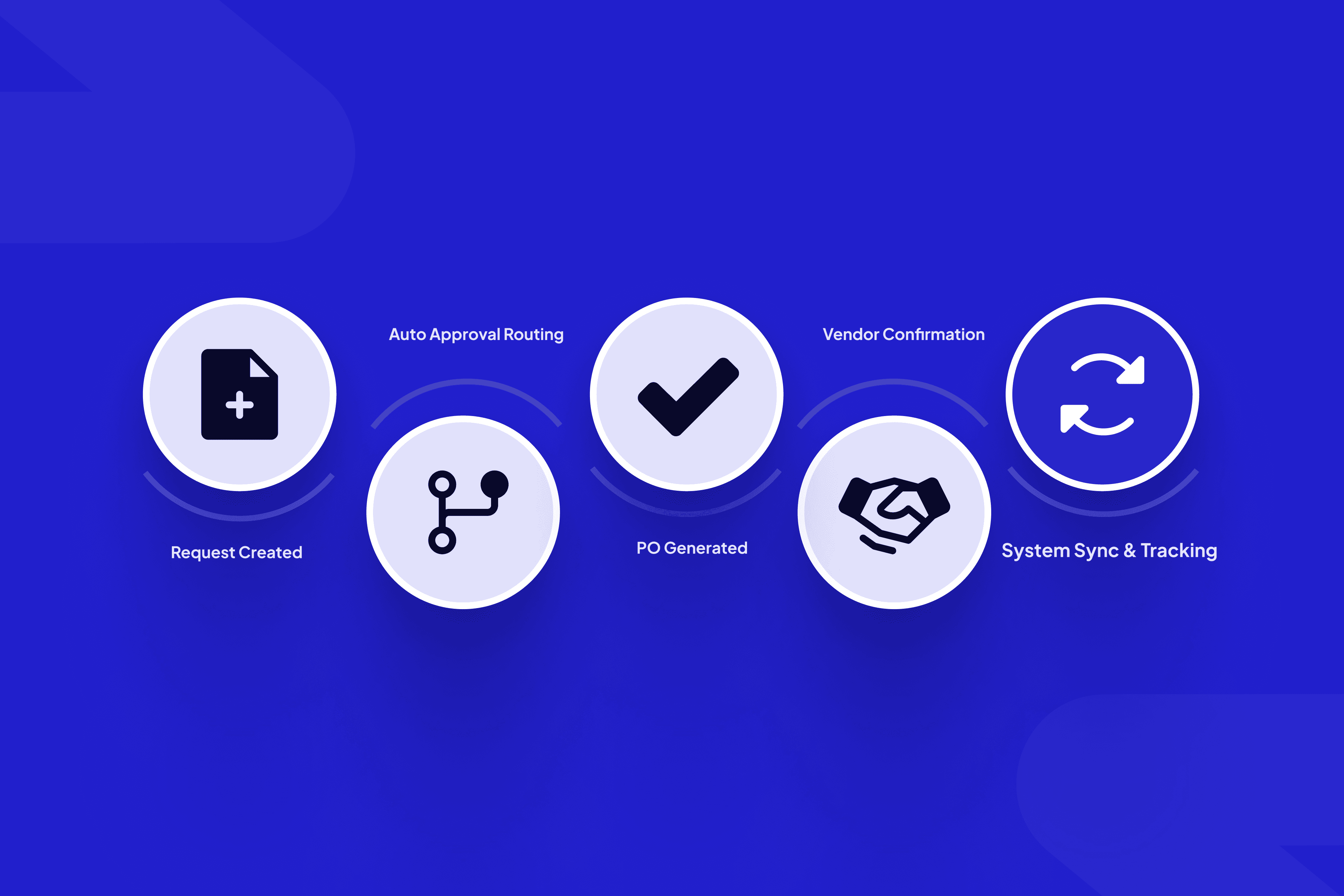
Here’s how a typical automated PO workflow looks in action:
Step 1: Purchase Request Submission
An employee creates a purchase request inside the system (no forms or emails). They choose the category, supplier, and budget code.
Step 2: Automated Approval Routing
The system identifies the right approver based on rules, like department, amount, or project, and sends an instant notification. No chasing signatures.
Step 3: Purchase Order Generation
Once approved, a PO is automatically created with a unique ID, itemized details, and a digital timestamp. It’s sent to both the requester and vendor.
Step 4: Vendor Confirmation
Vendors receive the PO through the system, confirm receipt, and can even update fulfillment status in real-time.
Step 5: System Sync & Tracking
The order is logged automatically into the ERP or finance tool. Teams can track delivery status, match invoices, and process payments, all from one dashboard.
This process eliminates the back-and-forth emails and data entry that normally drain hours from procurement teams. Every stakeholder can see the same PO status without asking for updates.
Common Problems Purchase Order Automation Solves
Every growing business eventually hits the same wall: the manual purchase order process becomes impossible to manage. What worked fine for a five-person team turns into chaos when ten departments start requesting items, each with their own suppliers and approval chains.
Automation directly fixes the most common issues companies face in procurement.
Lost or Delayed Approvals
Manual processes rely on people forwarding emails or printing PDFs. If one manager forgets to approve, the entire purchase stalls. With automation, approvals move instantly, the system notifies approvers via email, chat, or mobile, and follows up automatically if someone forgets. No chasing signatures, no bottlenecks.
Duplicate Orders
In manual setups, two employees might request the same item or reorder what’s already in process. Automated systems flag duplicates by cross-checking vendor names, SKUs, and departments before approval.
Errors in Data Entry
Human error is costly. A single extra zero on an order total can distort budgets. Automation pulls vendor, item, and pricing data from pre-verified sources, reducing typos and mismatched information.
Lack of Visibility
In traditional setups, finance teams often don’t know what’s been approved until invoices start arriving. Automated dashboards provide real-time visibility, and managers see every pending, approved, or paid PO at any given moment.
Missing Audit Trails
Auditing becomes a nightmare when records are spread across emails and Excel sheets. Automation creates digital trails automatically, logging who approved what and when, critical for compliance and financial reporting.
Problem | Manual Process Result | Automation Result |
Delayed Approvals | Stuck in inboxes | Instant routing & alerts |
Data Errors | Manual re-entry mistakes | Auto-synced vendor data |
Poor Visibility | No real-time tracking | Live dashboard updates |
Duplicate Orders | Repeated purchases | Smart duplicate checks |
Weak Compliance | Missing records | Full digital audit trail |
These fixes may sound operational, but their impact is strategic. Automation doesn’t just save time, it builds trust between teams, vendors, and leadership by creating a transparent system where nothing slips through the cracks.
Key Benefits for Businesses
Purchase order automation goes far beyond time savings — it changes how organizations handle procurement altogether. Businesses that automate typically see both quantitative and qualitative improvements within months.
Faster Approvals and Shorter Cycles
What used to take days now happens in hours. Rules-based routing and digital sign-offs mean no waiting for someone to check their inbox. Finance can close books faster, and operations get what they need without delay.
Real-Time Spend Visibility
Every request and purchase is tracked in one dashboard. Managers can filter spending by department, project, or supplier, giving finance teams the clarity they need for forecasting and reporting.
Reduced Processing Costs
Industry benchmarks show that automating PO workflows can reduce processing costs by up to 65% per order. When your team no longer handles repetitive admin tasks, they can focus on strategy and supplier management instead.
Stronger Vendor Relationships
Automated notifications and consistent approval timelines make vendors feel informed and valued. Fewer payment delays and better communication improve long-term trust and pricing negotiations.
Built-In Compliance and Audit Readiness
Automation systems automatically log every step — from submission to approval — creating a clean, verifiable audit trail. This makes compliance audits far easier and reduces financial risk.
Better Decision-Making
With real-time data, businesses can identify:
Which suppliers deliver the best turnaround times
Where unnecessary spending occurs
How to rebalance budgets between departments
It’s not just about purchasing; it’s about seeing your company’s entire spending pattern clearly for the first time.
How It Integrates with Your Existing Systems
One of the biggest myths about purchase order automation is that it requires replacing your entire tech stack. In reality, modern automation systems, especially custom ones built by teams like ScaleLabs, integrate seamlessly into your existing ecosystem.
Accounting and ERP Systems
PO automation tools sync directly with platforms like QuickBooks, Xero, SAP, and NetSuite.
When a PO is approved, it’s automatically pushed into your accounting software. This means:
No double-entry
Real-time budget update
Immediate visibility for finance teams
Inventory and Procurement Tools
If your business uses inventory software, the PO system can connect to it. As soon as a PO is approved, inventory levels update automatically, so purchasing and stock management stay aligned.
CRM and Vendor Portals
For B2B companies, POs can link with CRM data to track client or project-based purchases. Vendor portals also sync, allowing suppliers to confirm, update, and fulfill orders inside the same ecosystem.
Document Management and Cloud Storage
All PO records, invoices, and receipts are stored automatically in cloud drives (like Google Drive, Dropbox, or SharePoint). This centralization ensures that every stakeholder has secure, organized access without digging through folders.
API and Custom Integrations
Custom PO automation systems, such as those developed by ScaleLabs - can connect via API to almost any internal tool. Whether it’s HR for departmental spending or project management tools like Asana, integration keeps every platform in sync.
Why Integration Matters
Without integration, automation is just another tool. With it, it becomes the connective tissue of your entire financial process. Every purchase made automatically updates your accounting books, stock records, and vendor history, all in real time. The result?
Zero data silos
Complete accuracy across systems
A unified, live view of your company’s spending
Use Cases Across Industries
Every industry has its own procurement headaches, but the pain points are surprisingly similar: slow approvals, poor visibility, and endless paperwork. Purchase order automation helps solve those problems regardless of the sector. Here’s how it looks in practice:
Construction and Engineering
Construction companies manage multiple job sites, vendors, and materials at once. A missed purchase approval can delay an entire project.
With automation:
Field engineers submit purchase requests from mobile devices.
Managers approve in real-time from anywhere.
Materials arrive on-site faster, keeping projects on schedule and within budget.
Automation also integrates with project cost-tracking tools, so each PO is tied directly to a project phase or site, giving finance a complete breakdown of spend.
Manufacturing
In manufacturing, timing is everything. If raw materials aren’t ordered in time, production stops. Purchase order automation links your procurement and inventory systems, triggering POs automatically when stock falls below a certain threshold. This keeps the supply chain moving without constant manual supervision.
Professional Services
Agencies, consultants, and service providers often need to buy third-party tools or outsource tasks. Automated purchase orders make it easy to track spending by client or project, ensuring costs are billed accurately, and approvals are handled within hours, not days.
Healthcare
Hospitals and clinics deal with strict compliance and complex vendor management. PO automation ensures every purchase is documented, approved, and auditable, from medical equipment to pharmaceutical supplies, reducing administrative burden and ensuring regulatory readiness.
Retail
Retail operations rely on timing and supplier coordination. With automation, purchase orders are automatically generated when sales data shows certain SKUs running low. This ensures shelves stay stocked and seasonal peaks are handled effortlessly.
Metrics That Show It’s Working
Automation only matters if it creates a measurable impact. Businesses that implement purchase order automation typically see improvements in the following metrics:
Metric | Before Automation | After Automation |
Average PO approval time | 3–5 days | Under 24 hours |
Manual errors per 100 POs | 12–15 | 1–2 |
Procurement admin cost per PO | $25–30 | $8–10 |
Vendor satisfaction rate | ~60% | 90%+ |
Compliance audit readiness | Partial/manual | 100% digital audit trail |
Employee time spent on PO tracking | 6–8 hours/week | Less than 1 hour/week |
Additional Performance Gains
65% reduction in administrative overhead
Faster budget reconciliations due to real-time ERP updates
Higher employee satisfaction because teams spend less time chasing approvals
Better vendor retention due to transparent communication and faster responses
In short, automation doesn’t just optimize the process, it enhances the overall business rhythm. Teams move faster, data stays clean, and finance runs smoother.
The ScaleLabs Advantage
Most automation tools focus on templates. ScaleLabs builds systems that adapt to you, not the other way around.
Custom Workflows for Every Organization
No two procurement processes are identical. At ScaleLabs, we map your existing approval paths, financial rules, and departmental hierarchies, then build a workflow engine tailored to your company structure. This ensures your automation mirrors your real-world operations.
Smart Dashboards for Real-Time Control
Our dashboards go beyond “approved” or “pending.” You get full lifecycle visibility:
Department-wise spend
Project-level breakdowns
Vendor performance
Live approval analytics
All data is centralized and accessible in a single view.
Seamless Integration Across Systems
We build connectors that sync data with your ERP, accounting, and vendor systems, keeping all financial workflows synchronized. From QuickBooks to SAP to custom APIs, ScaleLabs ensures every purchase order aligns with your core operations.
Scalability Built In
As your business grows, your PO process shouldn’t slow down. Our systems are designed to scale, handling hundreds or thousands of requests daily without delays or database strain.
End-to-End Security
All PO data is encrypted in transit and at rest, ensuring compliance with modern data protection standards. Audit logs are automatic, making finance reviews or external audits painless.
Wrapping It Up: Why Purchase Order Automation Is a Game-Changer
Purchase order automation isn’t just about faster approvals; it’s about control, accuracy, and visibility. It replaces guesswork with data, manual tracking with live dashboards, and endless emails with seamless workflows.
With ScaleLabs, companies are not just digitizing their process; they’re creating a smarter financial backbone that grows with them. From startups optimizing their first approval flow to enterprise procurement teams managing hundreds of vendors, automation delivers results you can measure, not just imagine.